Click-to-Call for Websites & Apps
Click-to-Call: turn website visitors into phone conversations.
One-click voice (or WhatsApp Voice) from any web page or app screen. No download, no dialler. Just connect the customer to a real agent or AI voice agent, straight from the browser. Number masking for privacy, recording for compliance.
Why Web Forms and Phone Numbers Lose Leads
Most visitors never fill in a form. Many will not dial a number, and slow follow-up loses the rest. EnableX click-to-call puts a call, video or chat button on your website, mobile app or digital ads, so the visitor talks to your team while they are still on the page.
Get Started NowMore Conversations, Sooner
A visitor on your pricing page is ready to talk. Click-to-call connects them to the right agent in one tap, before the intent fades.
See Which Pages Drive Calls
Every call is logged with the page it came from, its duration and its outcome, so you can see which pages and campaigns bring in conversations.
No Telephony Charges for the Customer
Remove international calling barriers. The call stays on WebRTC, so customers connect from anywhere in the browser with no telephony charges on their side.
Instant Customer Connection
Some customers want to type, others want to talk or see a face. Click-to-call lets them choose text, voice or video from the same button.
Click-to-Call, Click-to-Video and Click-to-Text
Customers reach you by text, voice or video straight from your website, ads or mobile app, and every conversation lands in the same agent interface.
Click to Text
Add a Click-to-Text button to your website, mobile app, or marketing emails, allowing customers to start a chat with your agent or sales representative with just a tap.
Click to Voice
Allow customers to initiate audio calls with your team through a single click on your website, app, or digital platform. It runs on WebRTC, so the call stays off the phone network and costs the caller nothing.
Click to Video
With Click-to-Video, customers can initiate high-quality WebRTC video calls in one click from your website or app, which helps with advice, sales and support that go better face to face.
Advanced Agent Tools That Close More Deals
Give your sales team Click2Call video calling, screen sharing, file transfer, and call analytics, all within a single unified interface that integrates with your existing CRM and enterprise workflows.
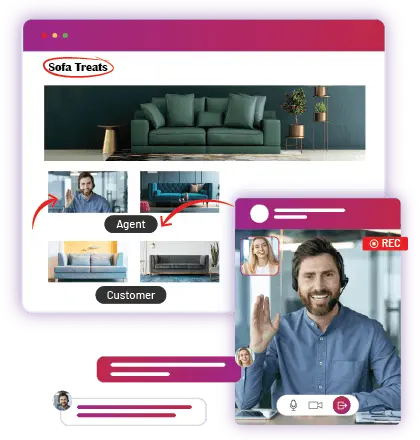
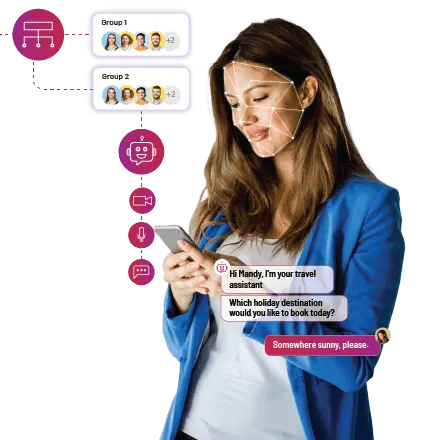
AI Voice Agents and Agent Assist
Put an AI voice agent in front of your team, or use AI to help your agents during the call.
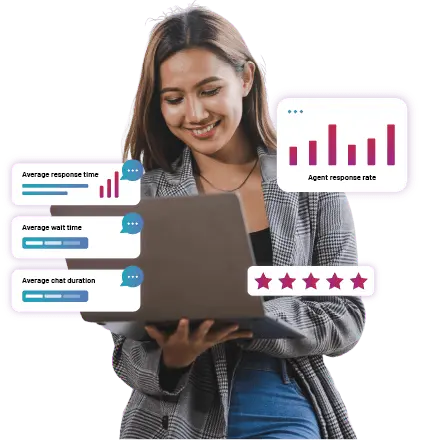
Click-to-Call Analytics
Use click-to-call data to see where customers get stuck and what makes them reach out.
Click-to-Call: Implement in 3 Simple Steps
Sign Up for an EnableX Account
Create your EnableX account and get sandbox access in minutes.
Choose Where the Button Goes
Decide where Click-to-Call belongs: product pages, checkout, support, or ads.
Generate the Code Snippets
Generate the code snippets and add them to your websites or apps.
Click-to-Call Use Cases by Team and Industry
Here is how marketing, support, banking and e-commerce teams use it.

Route by Page and Behaviour
Marketers use click-to-call to turn campaign and page traffic into sales calls.
Page-Based Routing – Connects users to the right team based on the page they are on. For example, a click from a product page goes to support, while a promotional page connects to sales.
Behaviour-Based Triggers – Set triggers based on user actions such as time spent on page. When conditions are met, a Click-to-Call pop-up appears, inviting the visitor to talk.

Voice, Video and Screen Sharing for Support
Support calls can move from audio to video and screen sharing without hanging up, which shortens the hard cases.
Switch From Audio to Video – Customers can start with an audio call and switch to video or start on Click-to-Video straight away.
Better Support with Video & Screen Sharing – Agents can visually guide customers, quickly diagnose issues, and provide real-time solutions using video calls and screen sharing.
AI-Powered Skill-Based Routing – Sends each call to the agent with the right skills, so it is resolved faster.

Banking Support at the Speed of a Click
Customers reach your support team in one tap from your banking app or website, and the agent sees where they came from.
Instant Support for Urgent Banking Needs – Fraud reports, account issues and loan applications each go to the right team with a single click.
Direct Financial Advisory via Click-to-Video – Customers can connect with relationship managers for financial planning, with screen sharing and annotation.
Compliance & Training-Ready Communication – Every call is recorded for compliance review and agent training.

Turn Browsers into Buyers
Shoppers can ask about a product, an order or a payment and get an answer at the moment they decide.
Guided Assistance for High-Value Purchases – Click-to-Video lets sales reps walk shoppers through high-value purchases with screen sharing and annotation.
AI Agent Assist – Conversation summaries and suggested answers help agents assist shoppers faster at the moment of decision.
Related EnableX Solutions
Video Call API
The WebRTC engine behind Click-to-Call. Embed live voice and video calls into any app with full programmatic control.
Video Call APICall Masking
Hide real phone numbers on every Click-to-Call connection, protecting customer and agent privacy while preserving compliance.
Call MaskingCustomer Service
Extend Click-to-Call into a full omnichannel contact centre, with an AI agent designed to resolve routine conversations.
Customer ServiceSee EnableX in action.
Talk to sales, or start a free trial. No credit card required.
Free trial credits · No credit card · API keys in 2 minutes